QuickBooks integration: sales into the books, untyped
A QuickBooks integration posts your sales, invoices and payments into QuickBooks from the systems where they happen, so nobody types an order into the books a second time.
We connect QuickBooks to Shopify, WooCommerce, eBay, Etsy, CRMs and payment providers, mapped to the accounts your accountant already uses.
What a QuickBooks integration does
Sales into the books
Each paid order becomes an invoice or a sales receipt, with the items, the tax and the customer filled in.
Payments matched
A payment from the card provider or the bank is recorded against the invoice it pays, so the open list stays true.
Customers in step
A new customer in the shop or the CRM appears in QuickBooks once, not three times under three spellings.
Your accountant’s map
Which account, which item and which tax line each kind of sale goes to, agreed with your accountant before anything is posted.
How we run our own books
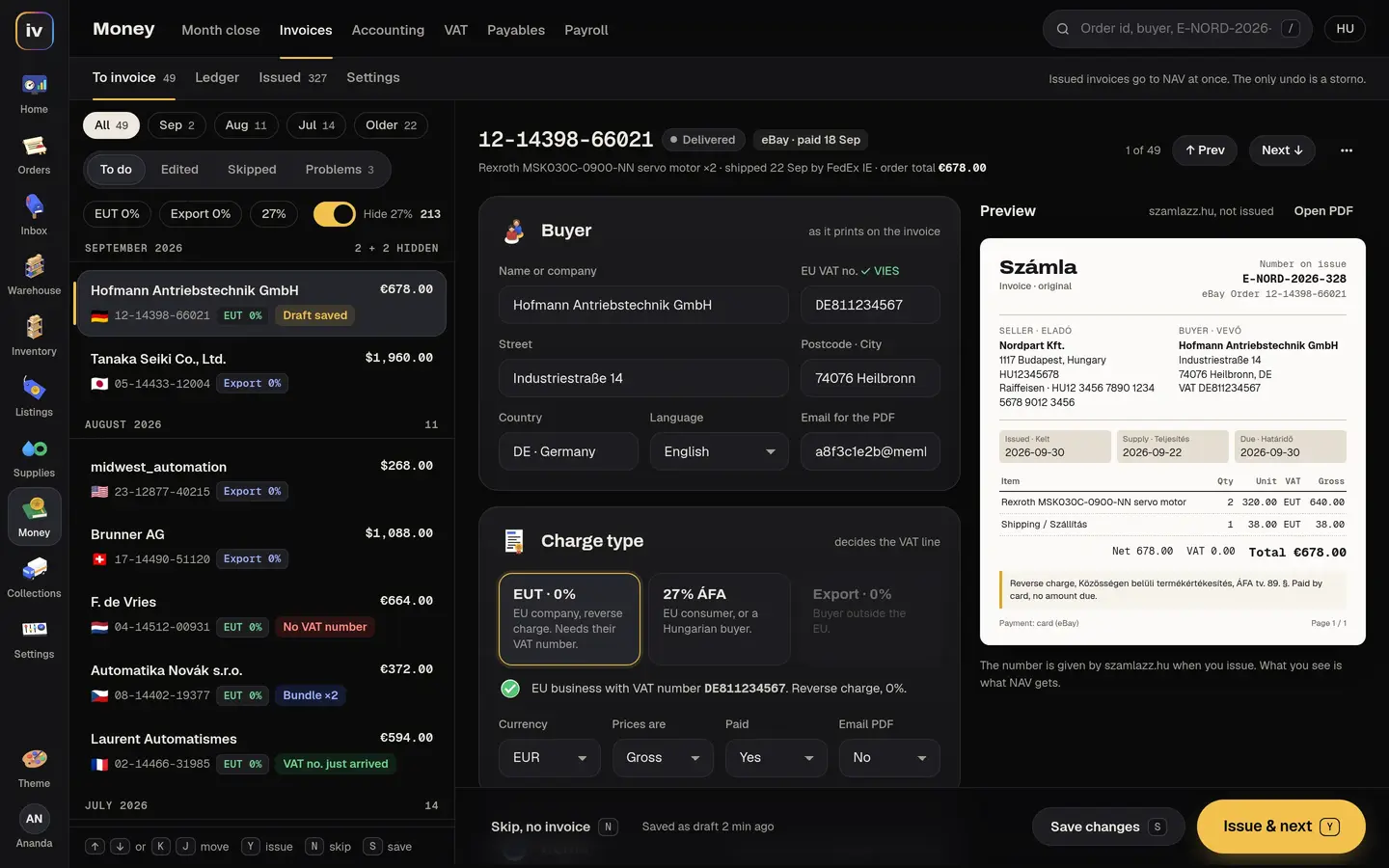
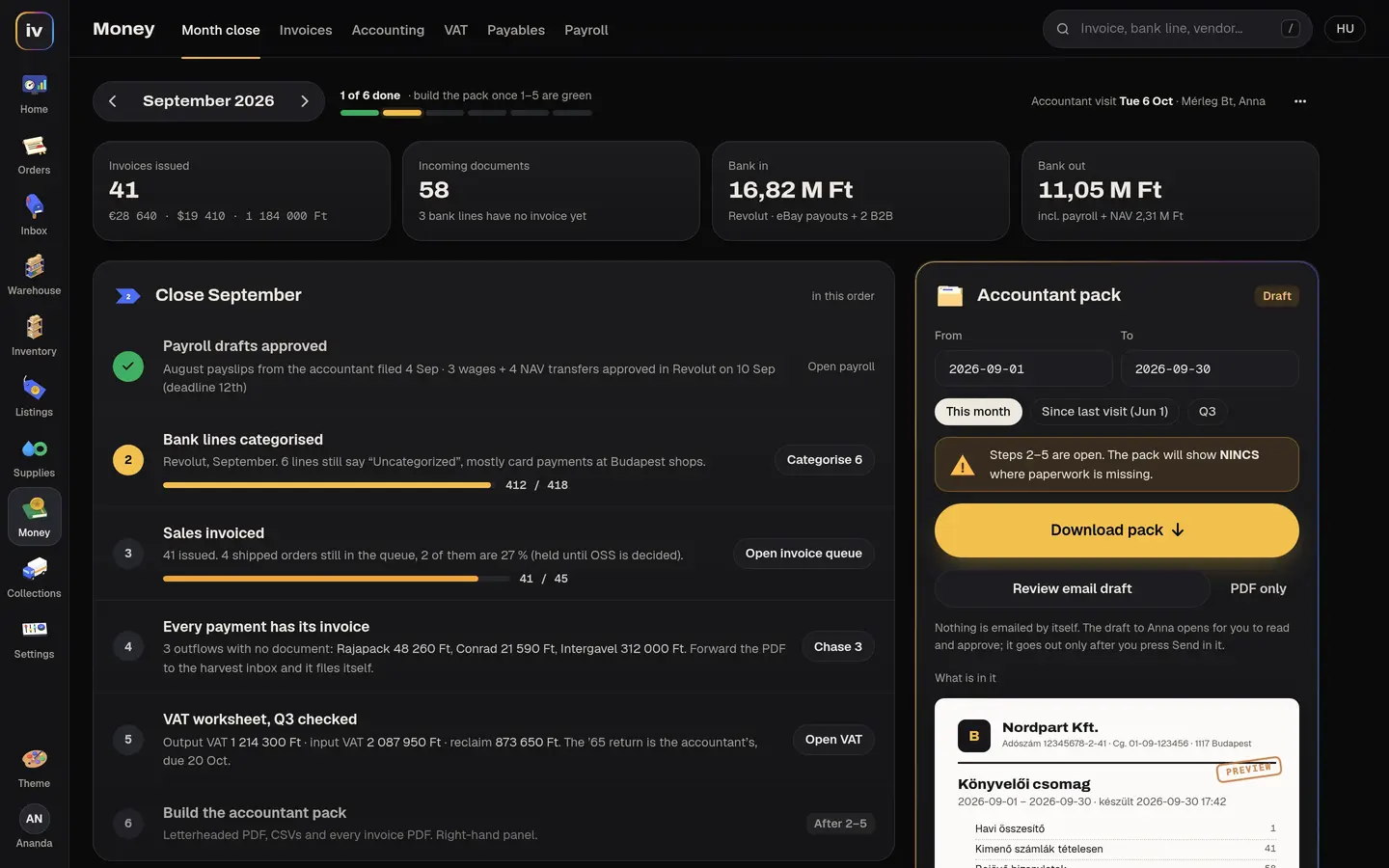
Our own order desk does the same job for a Hungarian business: it issues each invoice with the VAT line worked out per buyer, sorts the bank lines by rules, matches paid bills and closes them, and builds the month-end pack for the accountant.
Outgoing payments are only ever drafts until someone approves them. How that order desk works
Questions
What can be connected to QuickBooks?
Your shop and marketplaces (Shopify, WooCommerce, eBay, Etsy), your CRM, your payment provider and your own order or job system. Orders become invoices or sales receipts, payments are recorded against them, and customers stay in step.
Is the QuickBooks app marketplace enough?
Often it is, and we will say so on the call. A custom integration pays when the entry needs your own rules (which account, which class, which tax line), when one order touches several systems, or when the app you need does not exist.
Will my accountant still recognize the books?
That is the first thing we agree. We map each kind of sale to the accounts and items your accountant already uses, and nothing is posted until a test month matches what they would have entered by hand.
Can Stripe or PayPal payments go into QuickBooks?
Yes. Each payment is recorded against the invoice it pays, with the provider’s fee booked where your accountant wants it. See payment integration.
Does it post everything automatically?
It can. In our own systems a person approves invoices and outgoing payments before they go out; we suggest the same until the numbers have matched for a few weeks.
What does it cost?
We price it on a call, per milestone, after reading the systems on both sides. See what custom software costs.
Read next
- Custom software developmentWhat we built for an eBay parts seller, coating shops and a recycler, what it costs and how a build runs.
- What is an API?The plain-words answer, with the FedEx label our order desk books every day as the example.
- API integration serviceseBay, carriers, invoicing, payments and Google, connected so nobody retypes an order.
- AI workflow automationWhat AI reads, sorts and drafts for us, and the steps a person always keeps.
- Zapier or a custom integrationWhen a ready-made connector is enough, and when it costs you more than building one.
- The 30-Day AI Workflow SprintOne AI workflow live in your tools in 30 days, with an accuracy target in writing.
- Shopify integrationOrders, stock and invoices between your Shopify store, your marketplaces and your back office.
- WooCommerce and WordPress integrationYour WordPress shop connected to carriers, invoicing and the other places you sell.
- eBay and Etsy integrationOne stock count and one order screen for the marketplaces you sell on.
- Shipping API integrationUPS, USPS, FedEx, DHL and TNT labels booked from the order, tracking sent back.
- Stripe and PayPal payment integrationCard payments, refunds and payouts tied to your orders, invoices and books.
- For e-commerce sellersOrders, labels, customs, invoices and stock across your channels.
Stop typing sales into QuickBooks
Thirty minutes with us. Tell us where your sales happen and how they reach QuickBooks today, and we tell you what we would connect, how long it takes and what it costs.